 Critters is coming to Kickstarter.
 1 · The basics
The basics
Welcome to the small farm town of Critterton. Here, friendly work hard on their farms all week, then trade their wares at the Farmer's Market on the weekend. You can find all sorts of crops and trinkets at the Market, but lately there's a growing appetite for three crops in particular: Apples, Berries and Carrots.



You've just moved to Critterton and picked up a small, rundown farm. It isn't much, but with a little love and care, it can grow into a grand Farm that feeds the whole town.
Objective of the game
Complete to earn cards. The first player with 5 cards wins.
Getting there is a loop you'll repeat every turn: grow crops, buy better cards, pack into your . Each also gives your Farm a permanent bonus, so every one you earn makes the next one easier.
Deckbuilding
Critters is a deck-building game with a focus on resource management.
Everyone begins with the same small deck. Over the game you'll buy cards from the Market straight into your deck, and every loop through your deck gets a little more efficient than the last.
You'll never run out of cards. When your draw pile is empty, your discard pile is shuffled into a fresh one. Pay attention to what your deck contains, because your deck is your farm.
Terminology
A few card-game terms this rulebook (and the cards themselves) lean on:
- Hand: the cards you're holding.
- Draw pile (or Deck): your face-down pile that you Draw from.
- Discard pile: the face-up pile next to your draw pile, mostly cards you've already played.
- Play (a card): use a card from your Hand.
- Draw (a card): take the top card of your draw pile into your Hand.
- Effect: what a card does when it is played.
- Fizzle: an effect fails because it has no valid target. It simply doesn't happen, and triggers nothing.
- Rival: any other player.
Resetting your deck
Whenever you would Draw a card but your draw pile is empty, your deck is : shuffle your entire Discard pile and place it face down. That's your new Draw pile.
2 · Setting up
Setting up
Shuffling the decks
There are 4 decks in a game of Critters: Farm, , and , each with its own coloured, labelled card back.
Remove all cards from the Farm deck, then shuffle each of the 4 decks separately and place them in the centre of your playing area.
Deal out the starting decks
Each player starts with the same deck of 9 cards:
- 2× Apple Tree
- 2× Berry Bush
- 2× Carrot Patch
- 2× Friendship Charm
- 1× Pick of the Crop
Shuffle your starter deck and place it face down in front of you, then draw your opening hand of 3 cards.
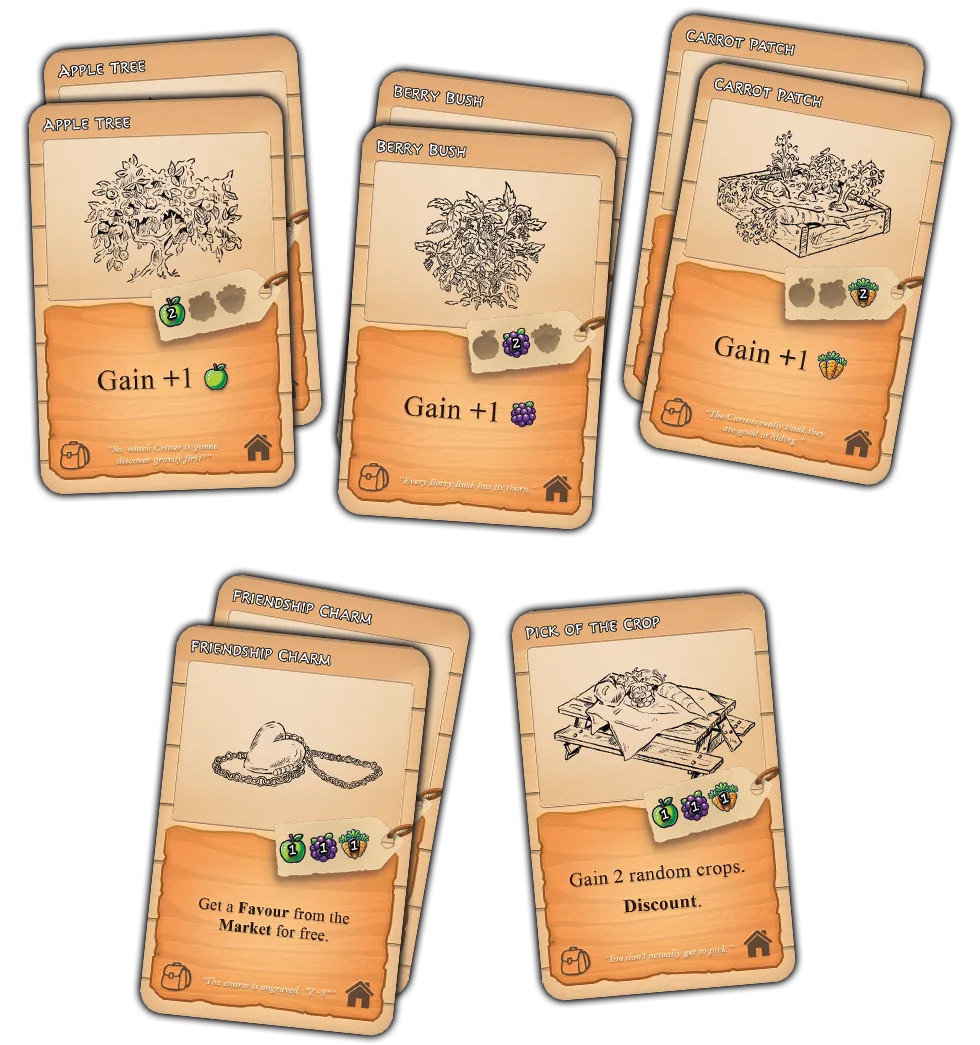
Cards in each starting deck.
Setting up the market
Place the 4 decks in a column, face down. Top to bottom, we recommend:
- deck
- deck
- deck
- Farm deck
Deal 4 cards face up in a row to the right of each deck. These 4 decks and 16 face-up cards are the Market.
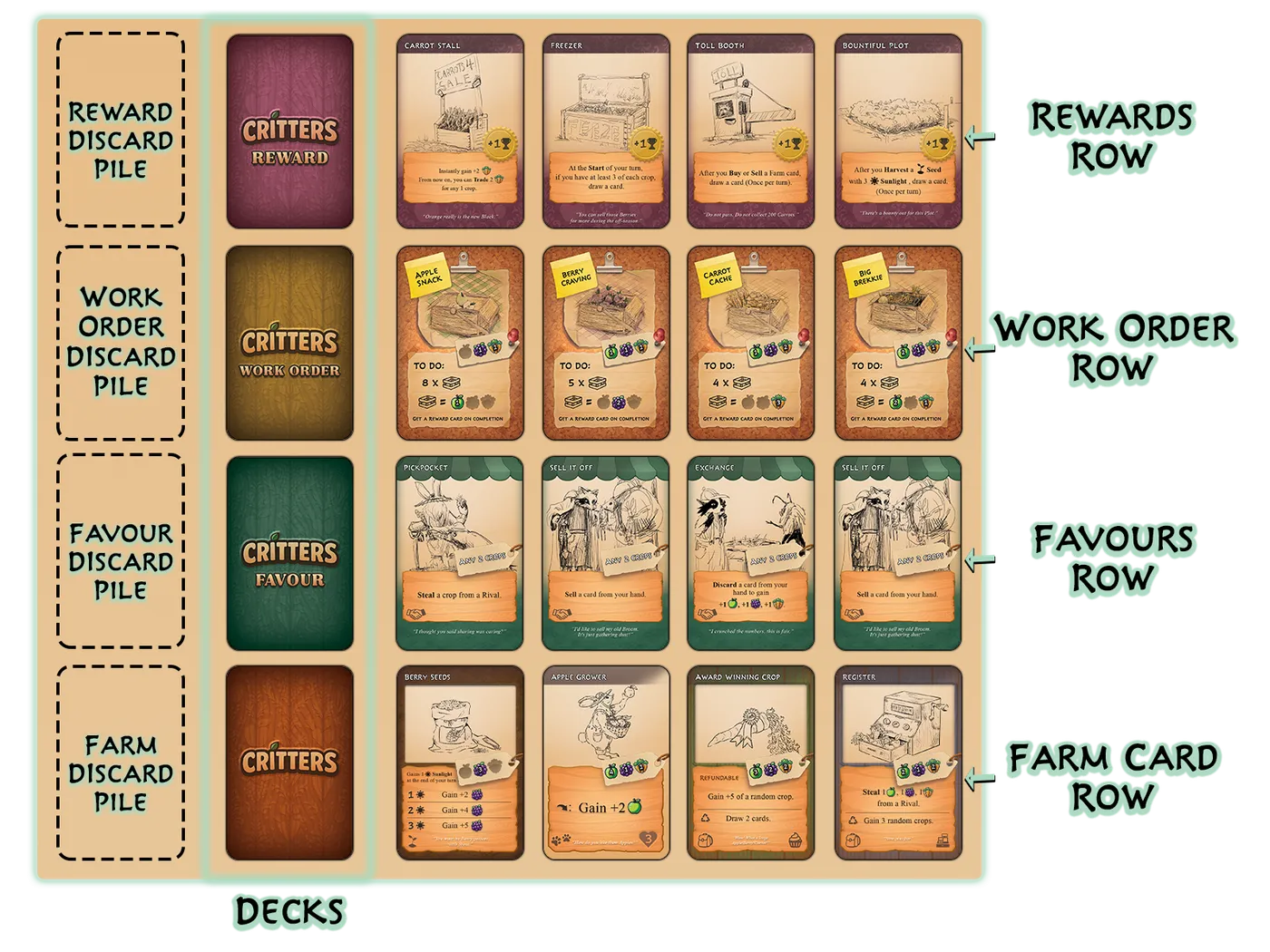
Recommended Market setup.
Setting up the Counters
There are 6 kinds of counters in Critters:
- Apple, Berry and Carrot counters are the game's resources: your Crops. The crops in front of you are your Stash.
- counters mark the a has spent.
- counters mark how far a planted has grown.
- counters mark packing progress on your .
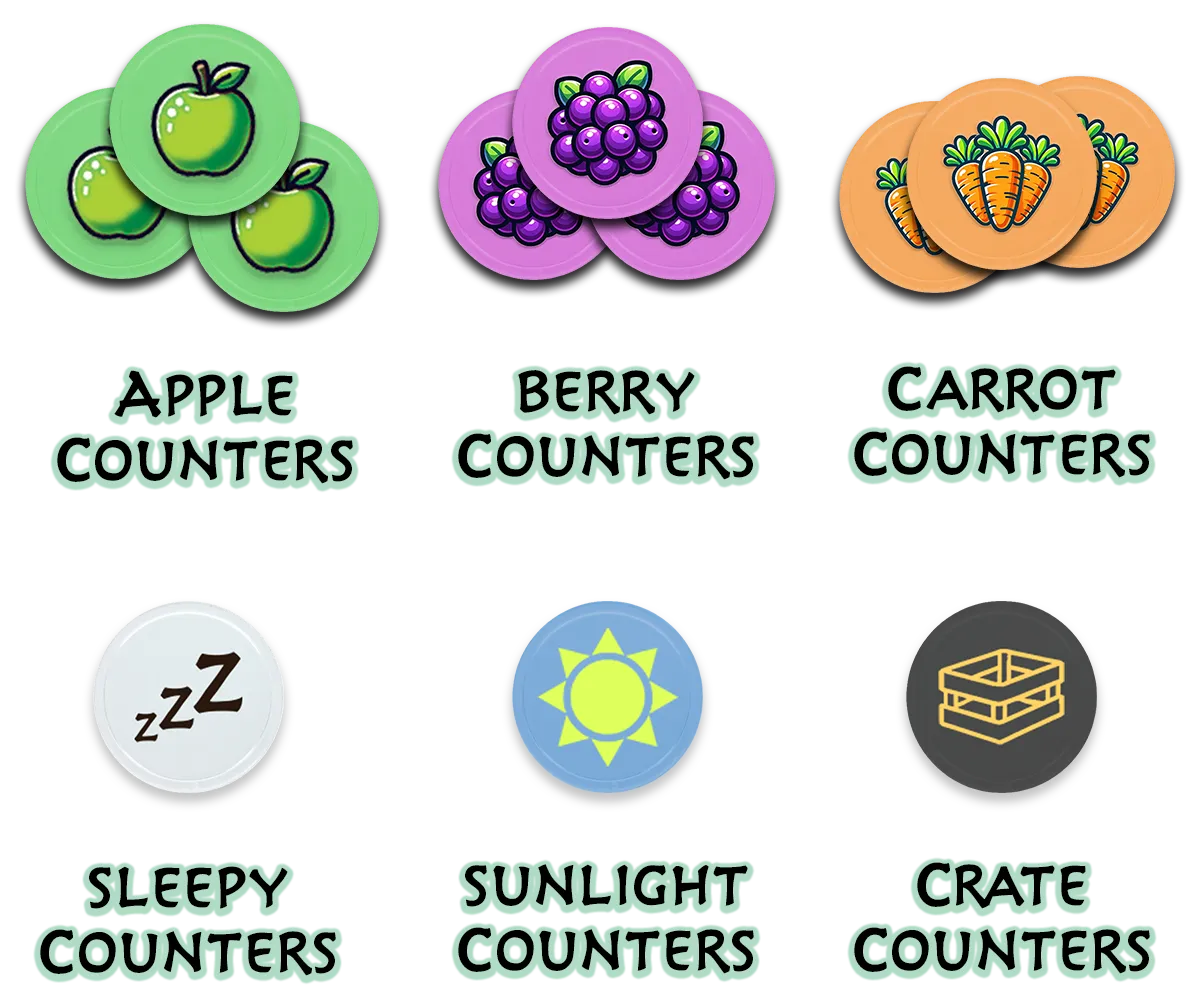
Game Counters.
Understanding the crop dice
Critters includes 3 Crop Dice: 2 white and 1 yellow, all with identical faces. They decide random crop gains and rolls.
Random crops
When an effect grants random crops, roll the Crop Dice:
- "Gain 3 random crops": roll all 3 dice and gain 1 crop per die.
- "Gain +2 of a random crop": roll 1 die and gain 2 of the crop shown.
Rolling 3 of a kind
Whenever 3 dice are rolled together and all show the same crop, it's a Season: every player gains +1 of that crop.
Three Apples? That's an Apple Season: everyone gains an Apple.
Discounts
When an effect says , roll the Yellow Die. Keeping the yellow die for Discounts means you can roll it alongside white dice and still tell the results apart.
The card Pick of the Crop says Gain 2 random crops and : so you can roll all 3 dice at once: white for the crops, yellow for the Discount.
What a Discount actually does is covered in the Discount keyword section.
Deciding turn order
Players take turns one at a time, passing clockwise. Decide who goes first however you like. With 2 players, we recommend rock-paper-scissors.
Going later is a small disadvantage, so later players start with crops in their Stash (rolled on the crop dice):
- 2nd player: 2 random crops
- 3rd player: 3 random crops
- 4th player: 4 random crops
Setup checklist
The whole setup, in order:
- Pull the cards out of the Farm deck and deal each player their 9-card starter deck.
- Shuffle the 4 Market decks and stack them in a column.
- Deal 4 face-up cards beside each deck. This is the Market.
- Put the counters and 3 crop dice within everyone's reach.
- Shuffle your starter deck and draw a hand of 3.
- Pick a first player; later players roll their compensation crops.
That's it. First player begins.
3 · Card types
Card types
Farm cards
Farm cards are the cards you buy into your own deck. There are 3 sub-types: , and .
Every Farm card has a Price-tag: the crops you must spend from your Stash to Buy it, and the crops you'd get back if you ever it.
A bought Farm card goes to your Discard pile. After your next deck , it's part of your rotation.
Items
cards carry a backpack icon at the bottom left.
Play an from your hand and its Effect triggers immediately. Once every part of the effect has resolved, the card goes to your Discard pile.
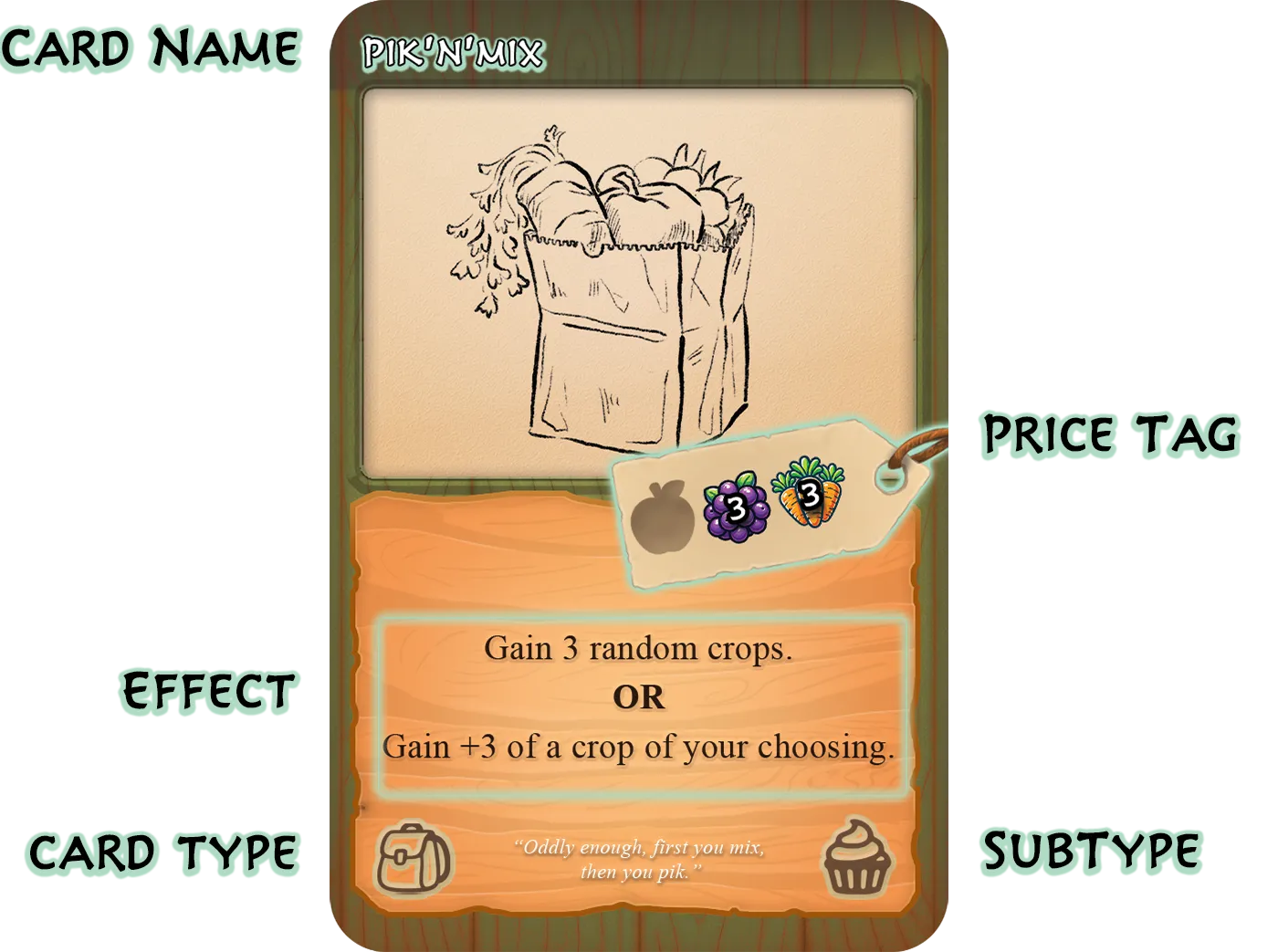
Item card breakdown.
Item Sub-types
Every is one of 4 Sub-types: , , or .
Treats
cards are about gaining crops: great early buys to get your production moving.
synergies usually your back in, letting you play them more than once per deck cycle.
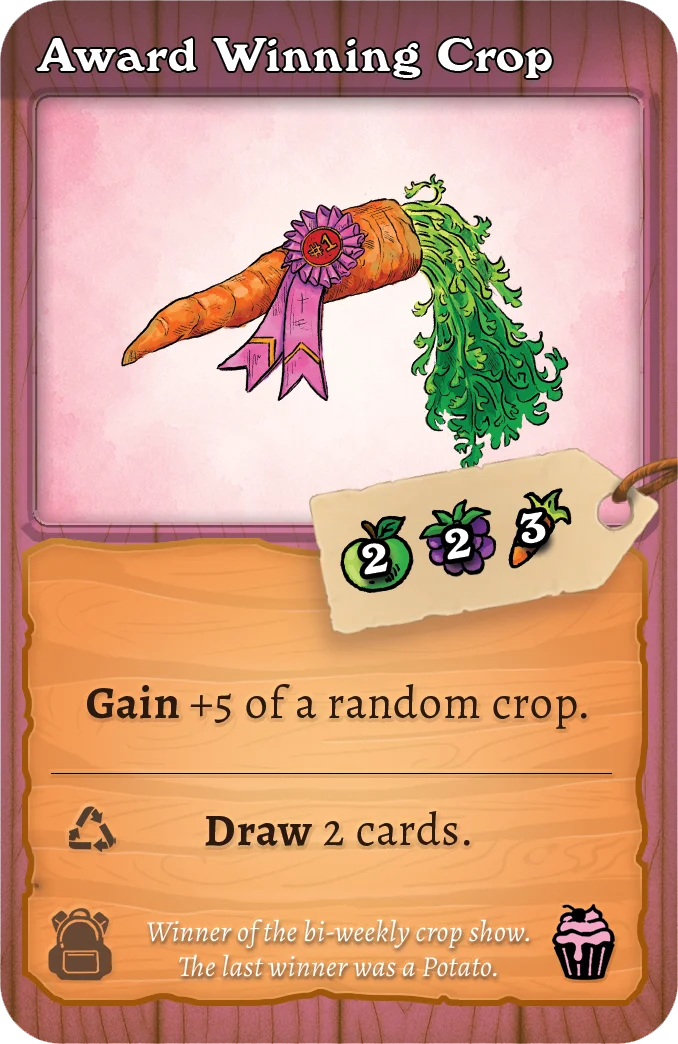
Example of a Treat card.
Tools
cards are flexible, but shine when combined with other cards. Think about what else is in your deck and set up powerful future turns.
synergies usually your , parking them on top of your draw pile for a big next turn.
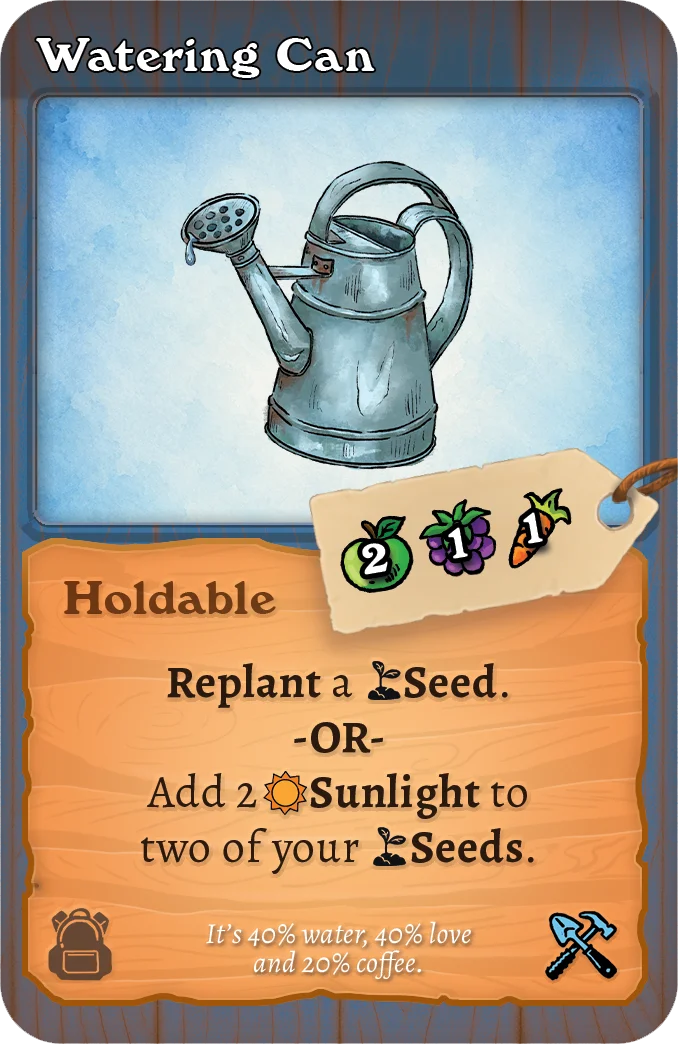
Example of a Tool card.
Finance
cards centre on Buying, , and . They are powerful for streamlining your deck while turning a profit.
synergies let you fire Sell and Trash triggers without actually removing cards.
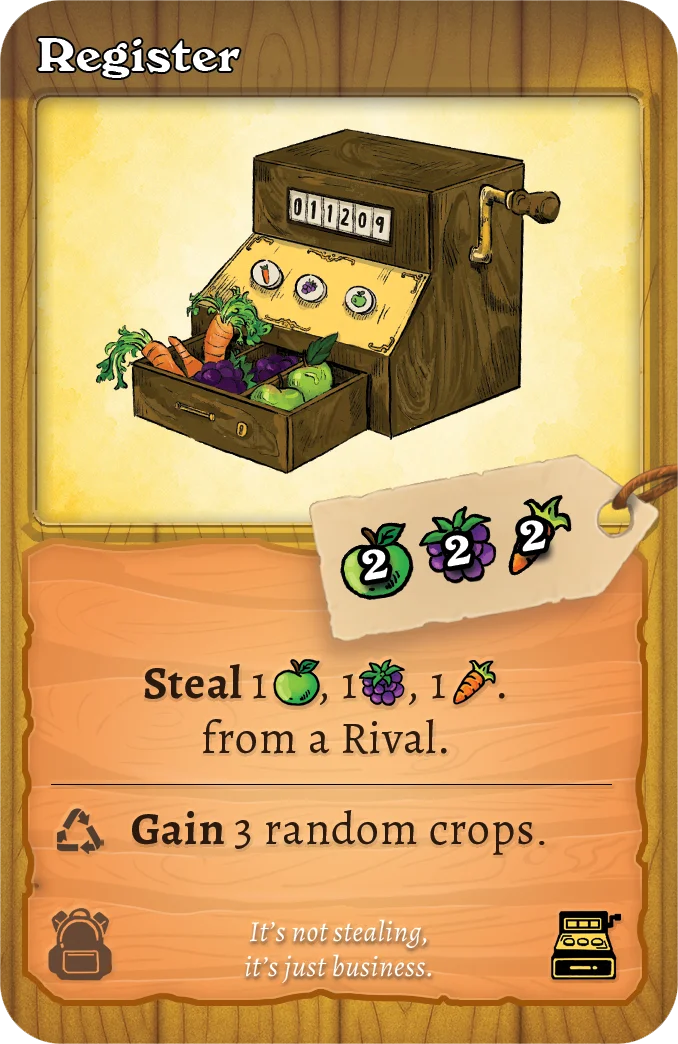
Example of a Finance card.
Gifts
are rarer than the other sub-types, and you don't buy them for yourself. them to a Rival to clog their deck in a variety of unpleasant ways.
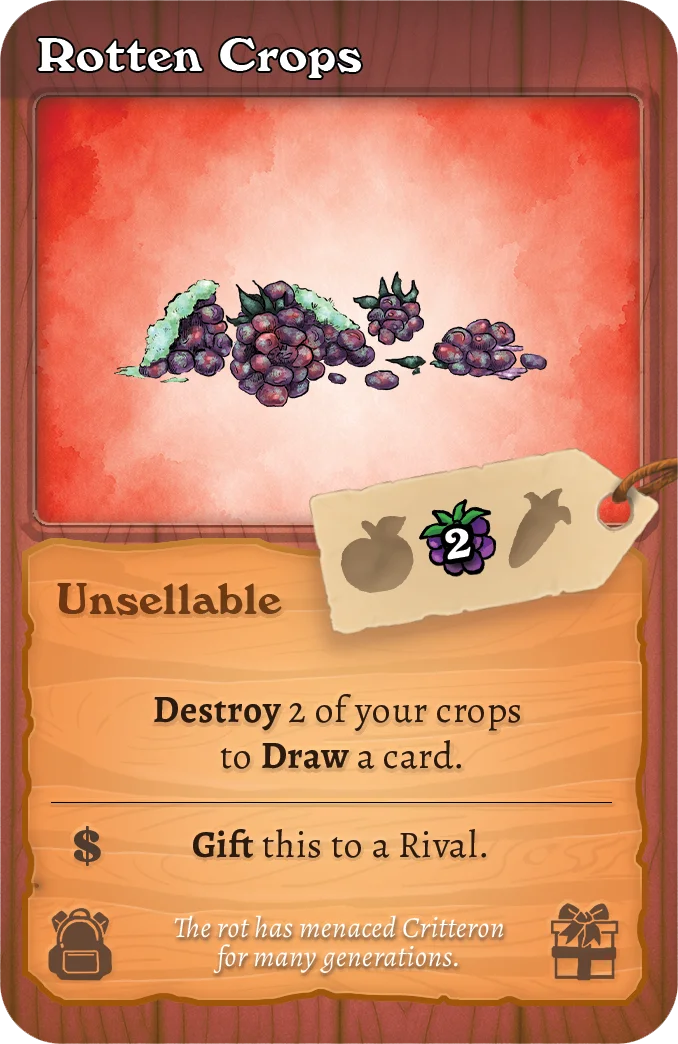
Example of a Gift card.
Critters
cards carry a pawprint icon at the bottom left.
Play a from your hand and it goes face-up into your Play Area. there are your Active : your farmhands, working turn after turn until they tire out.
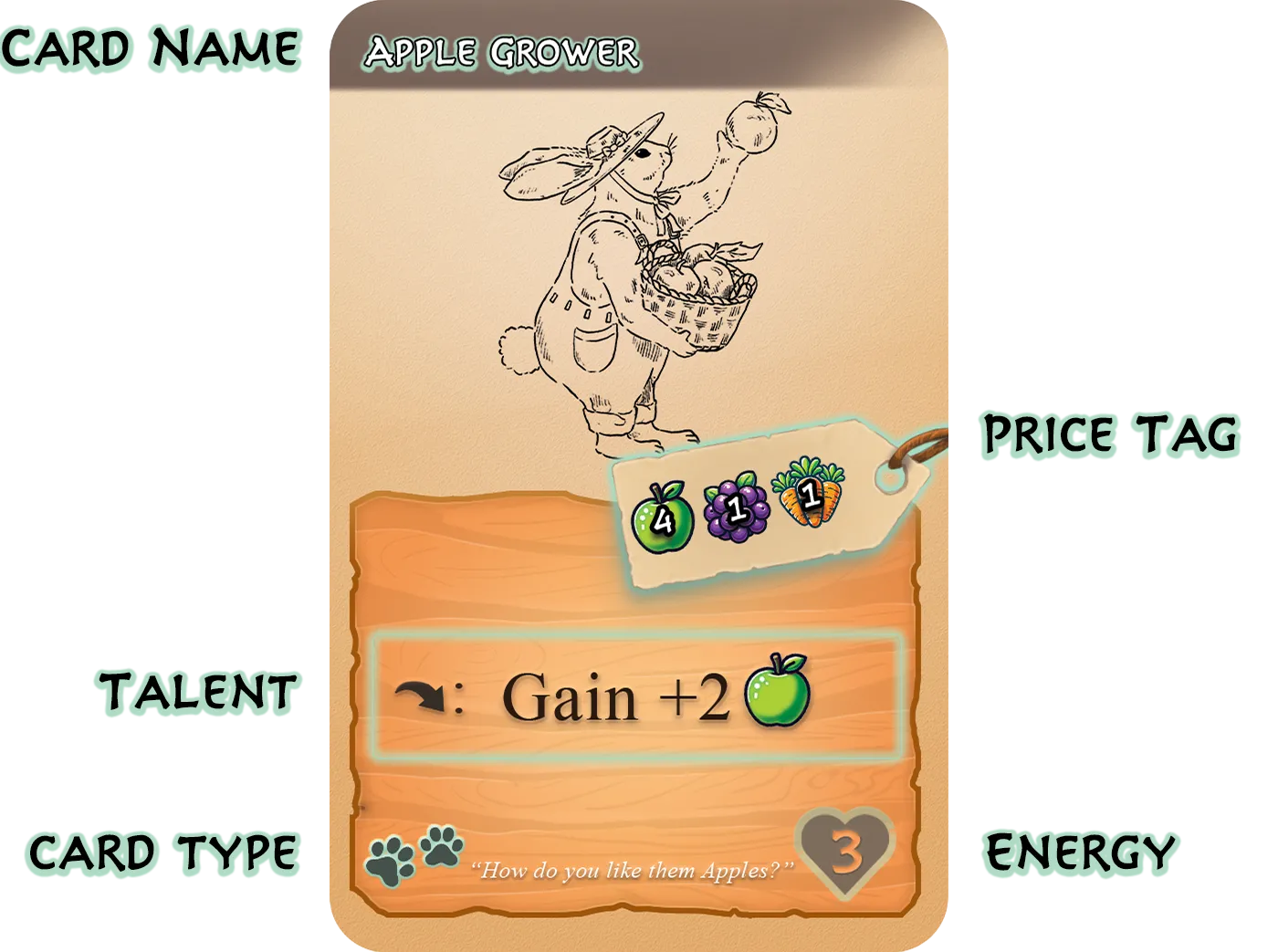
Critter card breakdown.
Energy and Sleepy
Every has an number in the heart icon at the bottom right. That's how much work they have in them. Each performed adds a counter.
Talents
Each has a , marked by the arrow icon in its card box. An Active can perform its once per turn: resolve the effect, add 1 counter, and rotate the card 90° clockwise to show it's been used this turn.
Exhaustion
When an Active 's counters equal its , it is Exhausted: remove its counters and put it in your Discard pile.
Don't worry: after a good night's sleep it'll cycle back through your deck, fresh and ready to work.
Seeds
are the patient farmer's card: very efficient for their price, if you can wait.
Play a from your hand and it goes face-up into your Play Area. there are Planted.
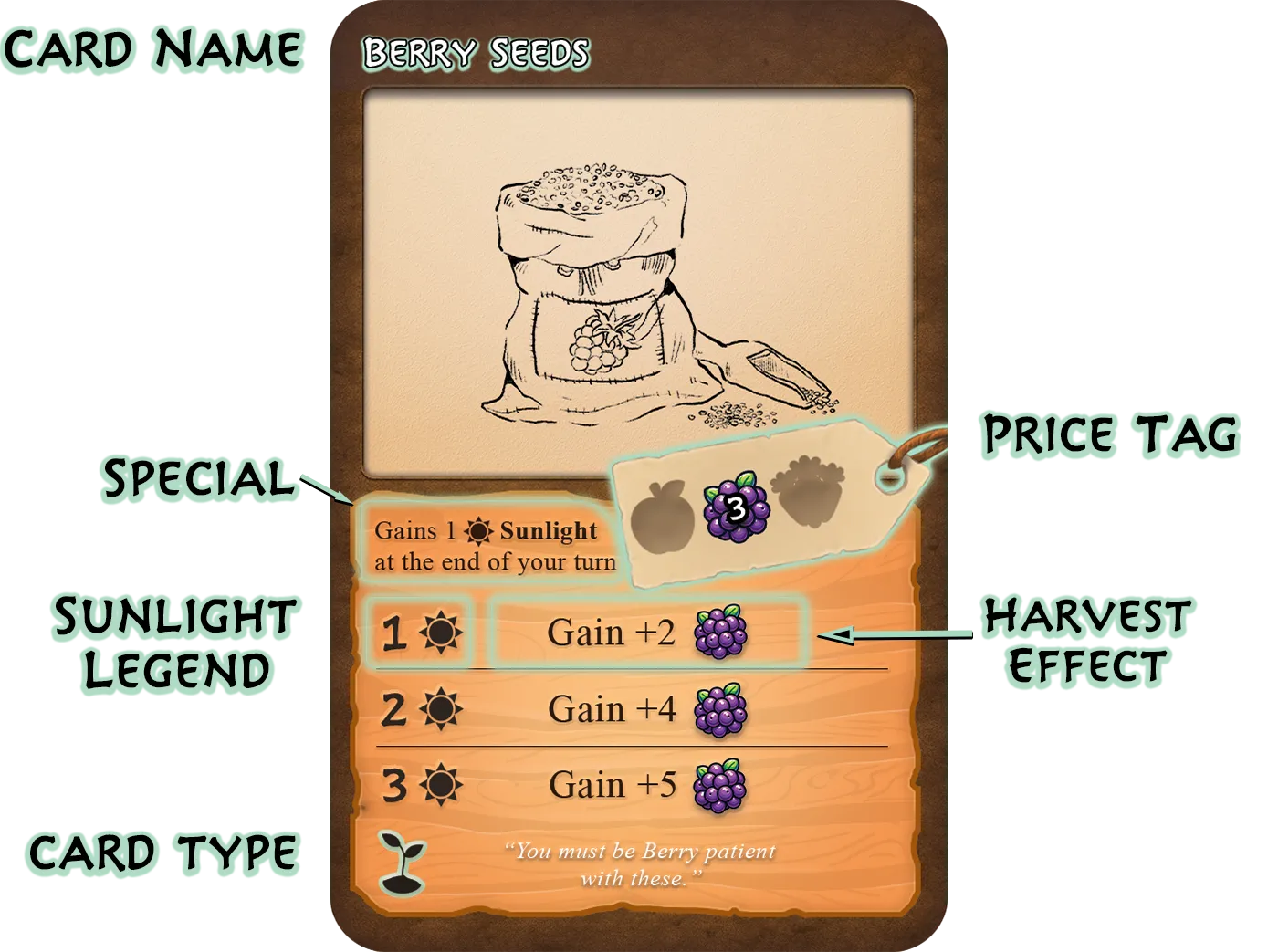
Seed card breakdown.
Gaining Sunlight
At the end of each of your turns, every one of your Planted gains 1 counter, up to a maximum of 3.
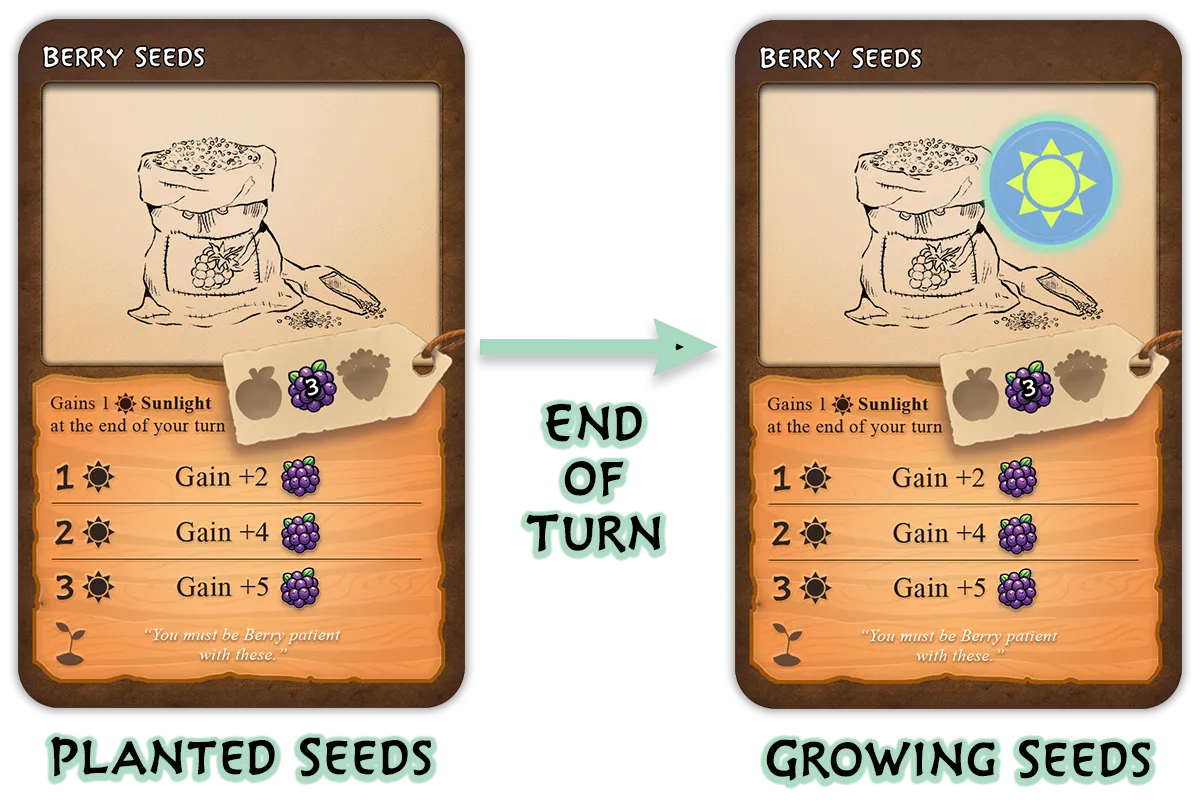
Planted Seeds gaining Sunlight.
Harvesting Seeds
During your turn you may a Planted whose counters match a row of the card's Legend. Resolve the effect for that row, then put the in your Discard pile.
More means a better harvest. Patience pays.
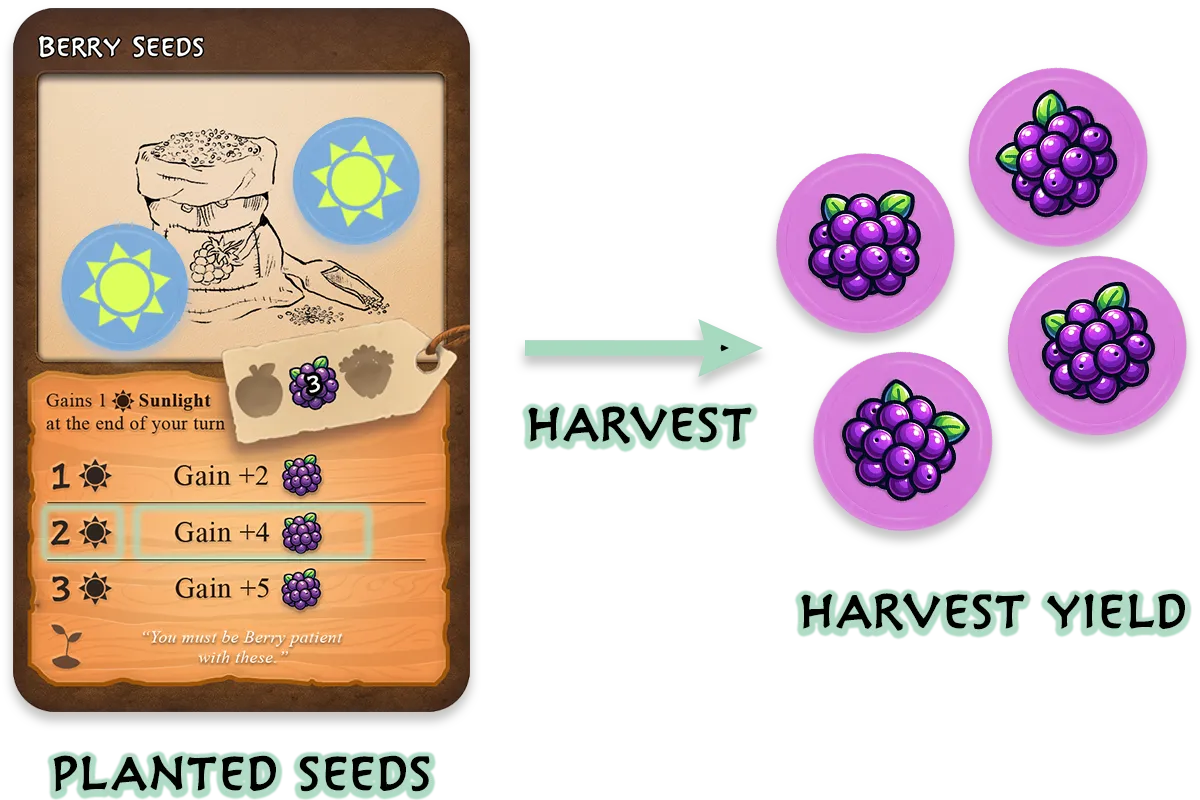
Harvesting Planted Seeds.
Extended Seed Effects
Some extend their effect as they grow, shown by a trailing "..." joining one legend row to the next.
When you at the higher row, resolve the earlier row's effect and the extension after the "..." as one combined effect.
Favours
Every costs "Any 2 crops": spend any combination of 2 crops from your Stash to Buy one from the Market.
A 's effect happens immediately when bought. It then goes to the discard pile (next to the deck in the Market): it never enters your deck.
The deck holds a wide variety of effects; some appear twice, others only once.
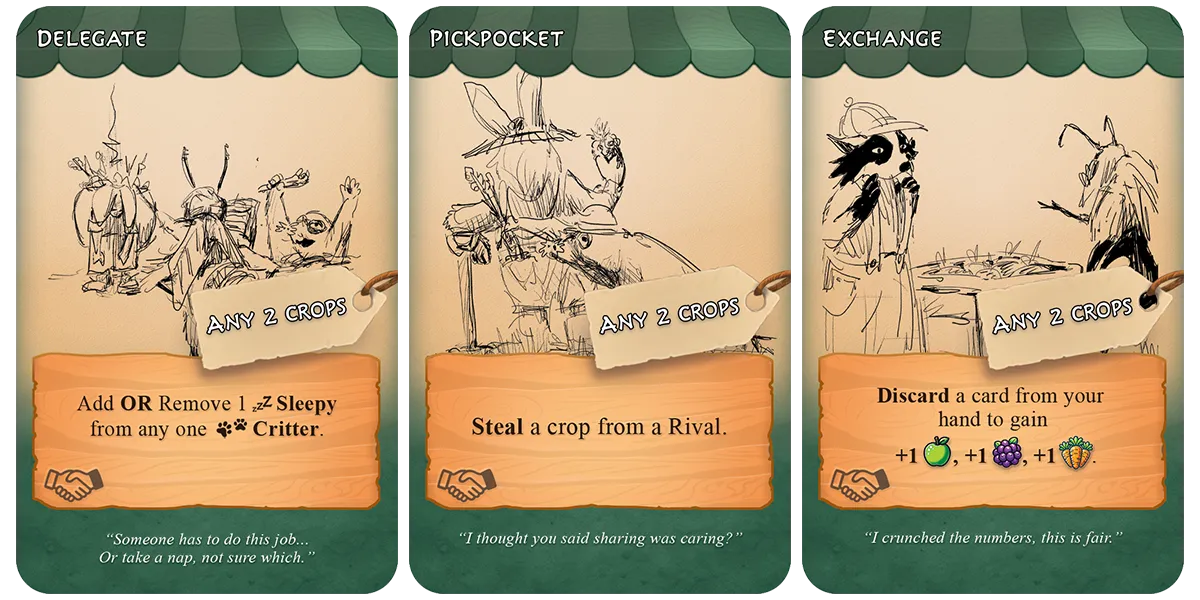
Examples of a few Favour cards.
Free Favours
Some cards say "Get a from the Market for free." Choose any face-up in the Market and perform its effect as though you'd bought it.
Everyone starts with 2 Friendship Charm cards in their deck. Make them count whenever they come up.
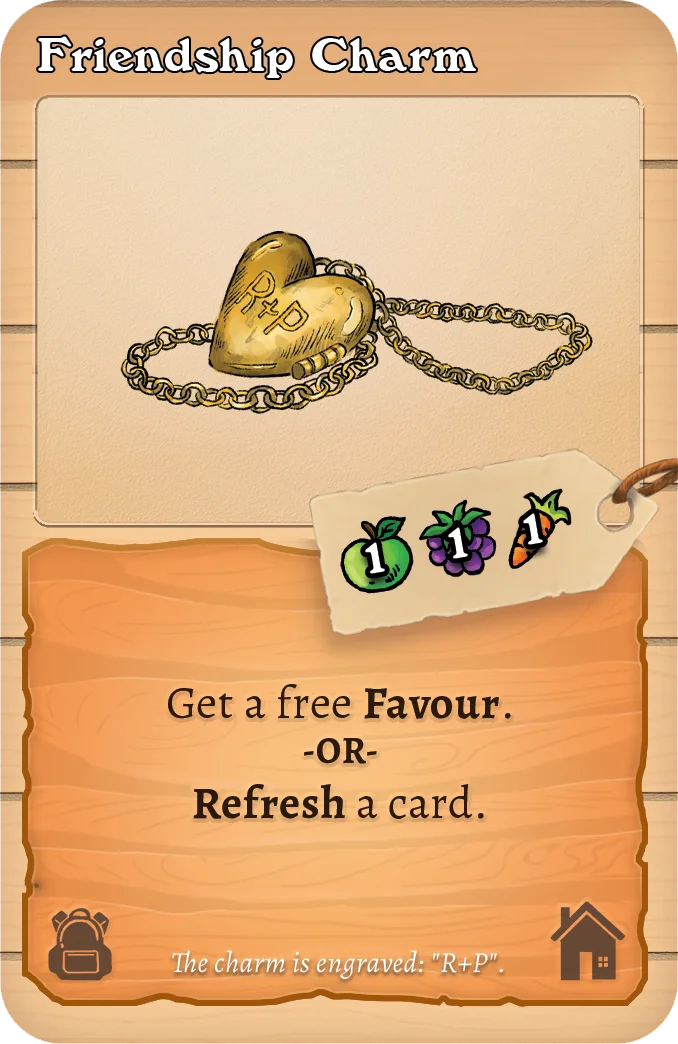
Example of a 'free favour' card effect.
Work Orders
When you Buy a , place it face-up in your Play Area. You may have up to 3 at a time.
are how you win: each completed order earns a card, and 5 ends the game.
To complete one, pack the required number of into it, usually over several turns. The card shows which crops each requires, and how many finish the job.
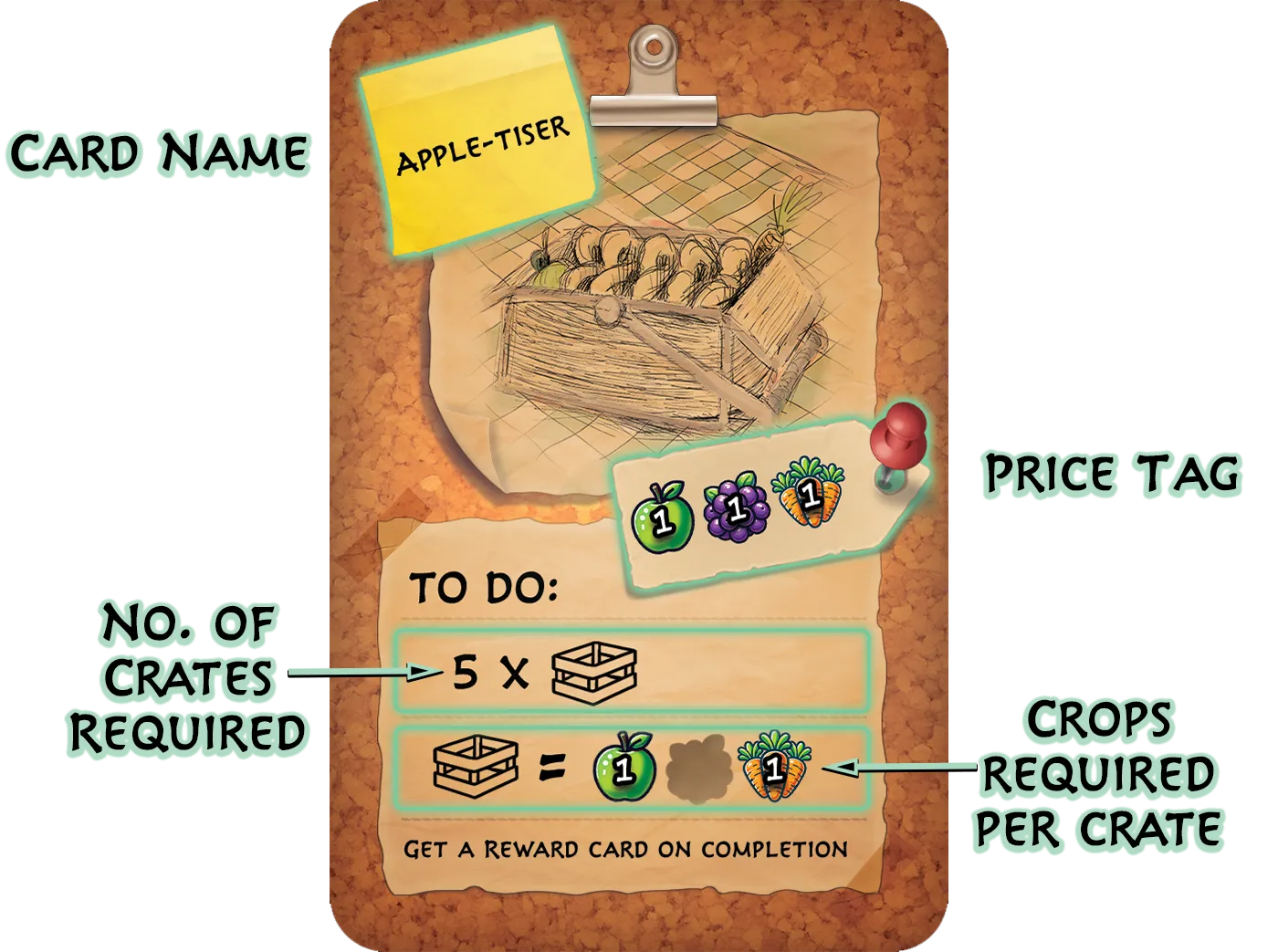
Work Order breakdown.
Packing Crates
Pack a by spending its listed crops from your Stash, then placing a counter on the .
Normally each of your can be packed once per turn. After packing one, rotate it 90° clockwise as a reminder.
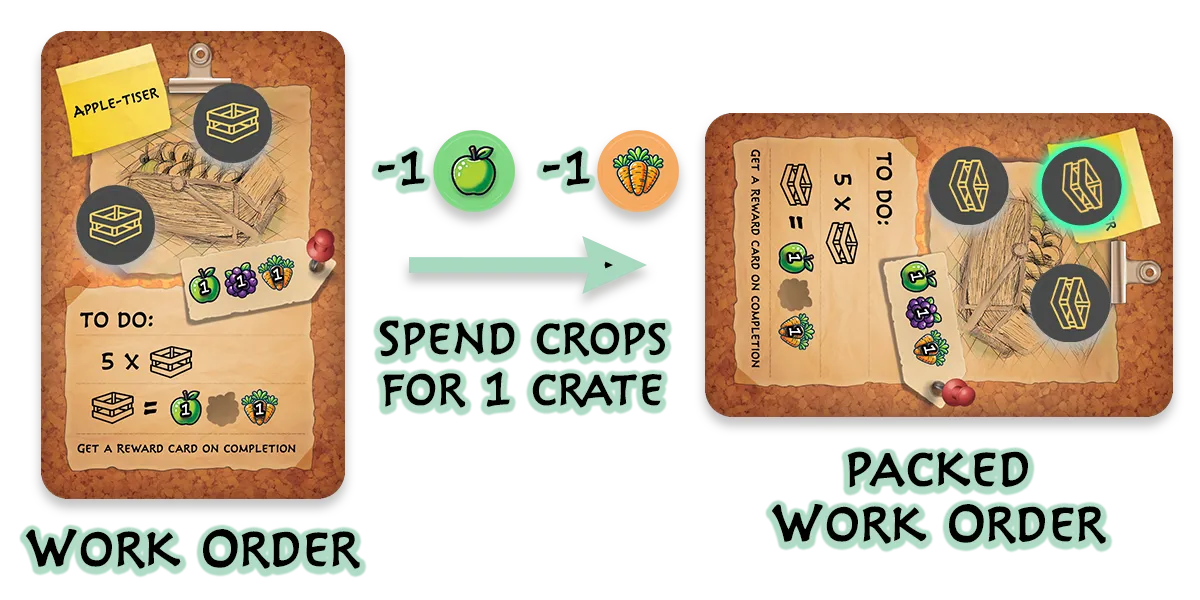
Packing a crate into a Work Order.
Overtime packing
Want to pack a that's already been packed this turn? That's , and the crew charges extra: 1 Apple, 1 Berry and 1 Carrot on top of the 's normal cost, for every additional that turn.
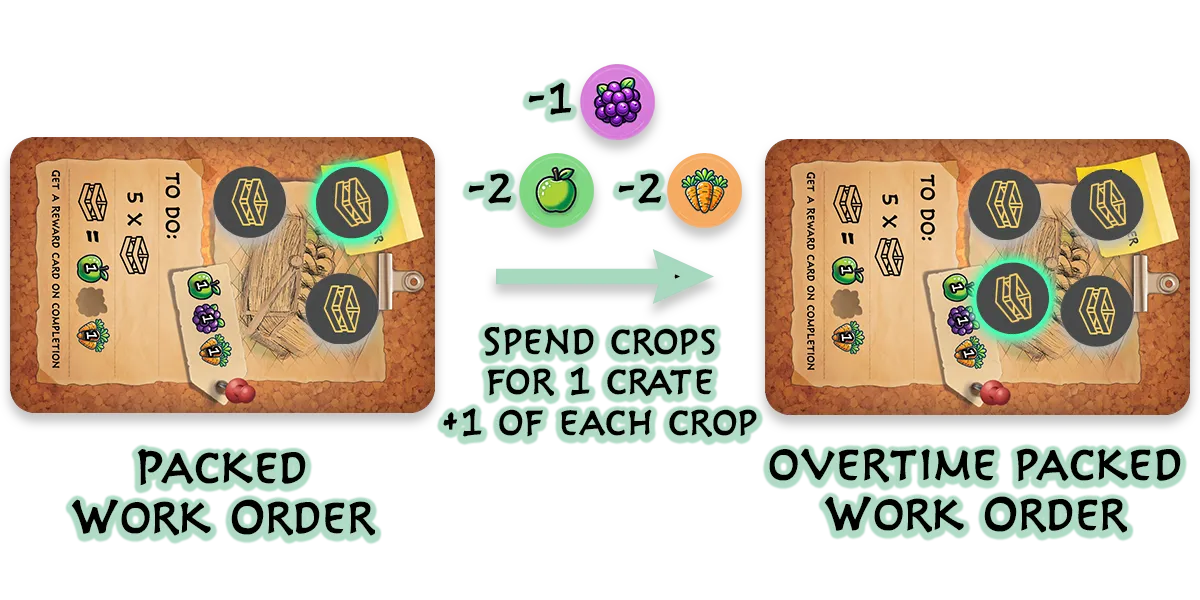
Overtime packing example.
Completing Work Orders
Once a holds its required , you may Complete it: choose one of the 4 face-up cards in the Market and place it in your Play Area. That's +1 Victory Point.
Then clear the counters and put the completed in the Work Order discard pile.
Rewards
Each completed lets you choose one of the 4 face-up cards in the Market.
A is worth 1 Victory Point and grants a permanent bonus to your Farm for the rest of the game.
Victory Points
Each is 1 Victory Point. Reach 5 Victory Points and you win the game on the spot.
Reward Bonuses
Every carries its own bonus effect, active for the rest of the game. Choose with your deck in mind, because the right can snowball a strategy.
4 · Taking your turn
Taking your turn
A turn has three phases. It looks like a lot at first, but after a round or two it flows by itself:
- Start: resolve any "start of turn" effects.
- Main: in any order, as often as you can afford: play cards, buy from the Market, use , , pack and complete , trade crops.
- End: reset your , grow your , discard your hand, draw 3.
Starting your turn
Usually nothing happens here, but some effects trigger at the start of your turn. Resolve those before doing anything else.
During your turn
Take any of the following actions, in any order, as many times as you can afford. End your turn whenever you like.
Playing cards from your hand
Playing a card from your Hand is always free, and anything left in hand is discarded at end of turn, so don't hoard.
- and cards go into your Play Area.
- cards take effect immediately, then go to your Discard pile once all their effects have resolved.
Buying cards from the market
Announce what you're Buying, spend the crops on its Price Tag from your Stash, and take the card. The Market refills immediately.
- Farm cards go to your Discard pile: they're deck upgrades. (Farm cards)
- take effect immediately, then go to the Market's discard. (Favours)
- go to your Play Area: maximum 3 at a time. (Work Orders)
- cards cannot be bought: only earned. (Rewards)
Using your Critter's talents
Each Active may perform its once this turn: resolve the effect, add a counter, rotate the card. (Talents)
Harvesting your Seeds
any Planted whose matches a row of its legend: resolve that row, discard the . (Harvesting Seeds)
Packing and Completing Work Orders
Pack each of your once by paying its cost, or more than once with . Turn in any full for your choice of the 4 face-up . (Work Orders)
Trading crops
Swimming in Apples but short a Berry? As often as you can afford, Trade 3 of one crop type for 1 of another.
Ending your turn
End-of-turn steps happen in this order:
1. Reset your Critters
Stand every Active upright (face up, un-rotated). They keep their counters, but they're ready to perform their again next turn.
2. Grow your Seeds
Add 1 counter to each of your Planted .
3. Discard your hand
Discard every card still in your Hand. Cards discarded this way do not trigger effects.
A card may be kept instead. Reveal it to the other players first.
4. Draw 3 new cards
Draw 3 cards from your Draw pile (Resetting your deck if it runs out). Your turn is over, and play passes to the next player.
5 · Reference
Keywords
Card effects use a shared vocabulary. Three families are worth noticing: keywords that move cards within your deck (, , ), keywords that remove cards from your deck (, , ), and keywords that work on the Market (, , ). The rest are one-offs and card labels.
Shuffle
Place the card on top of your Draw pile, then shuffle your deck.
If your draw pile was empty, the Shuffled card becomes its only card.
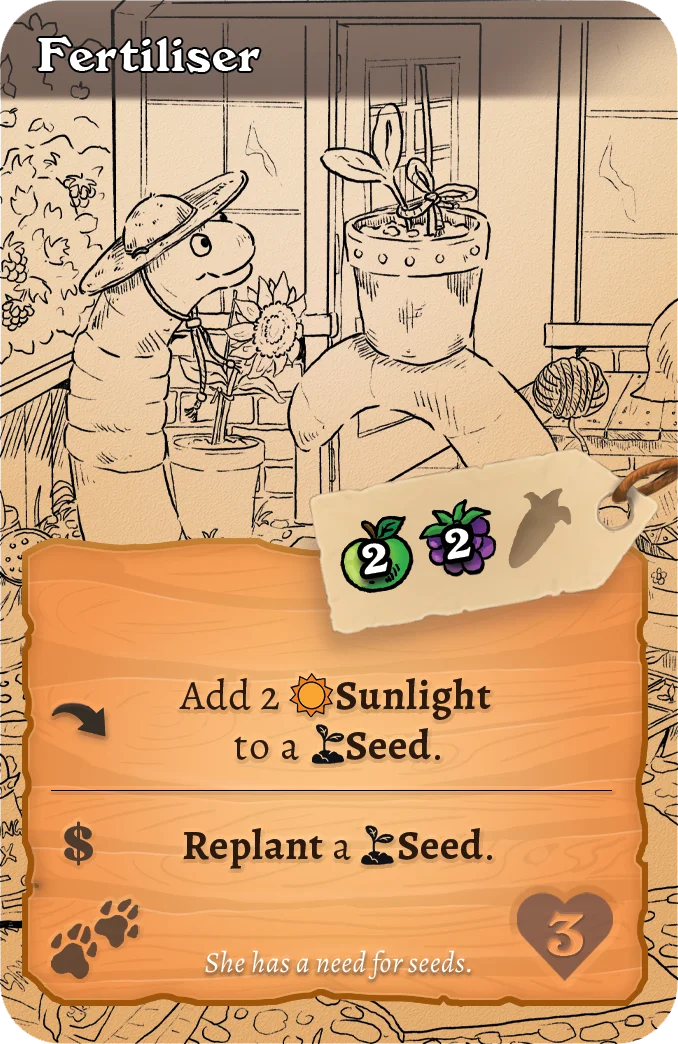
Example of a Shuffle effect.
Skewer
Place the card on top of your Draw pile: you'll draw it soon.
If your draw pile was empty, the Skewered card becomes its only card.
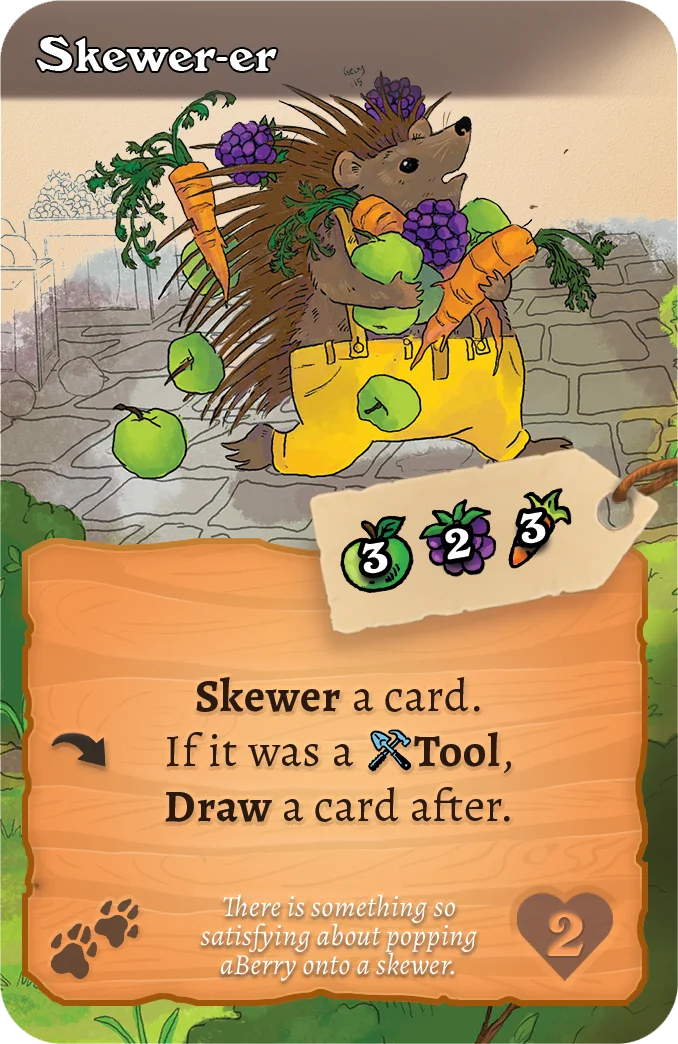
Example of a Skewer effect.
Burrow
Place the card on the bottom of your Draw pile.
If your draw pile was empty, the Burrowed card becomes its only card.
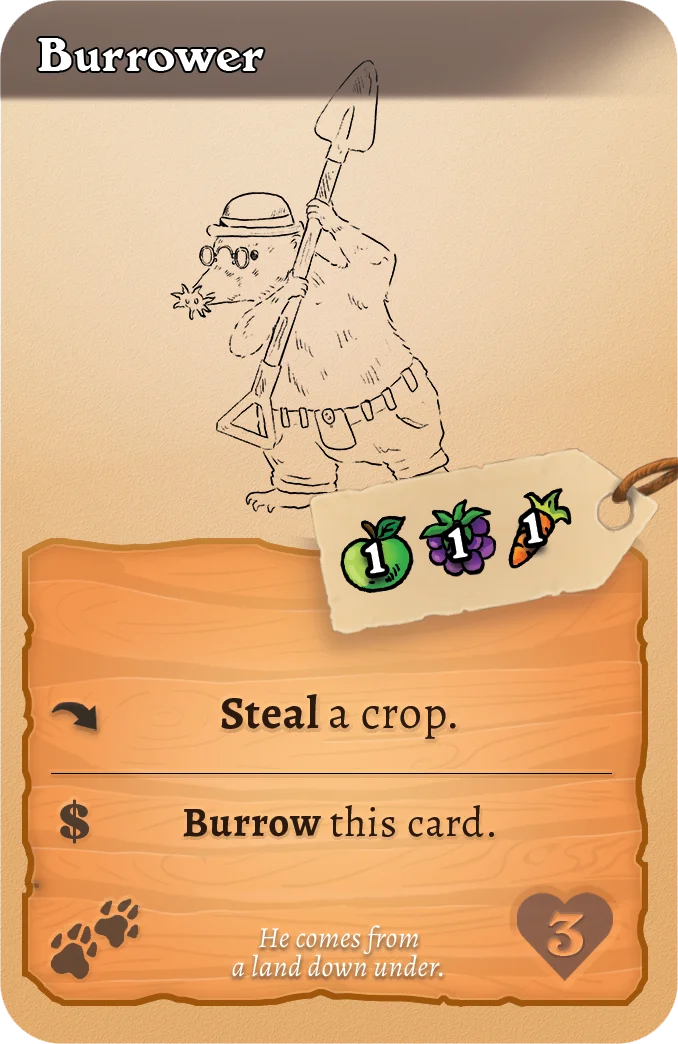
Example of a Burrow effect.
Sell
Remove the card from your deck entirely: gain crops equal to its Price tag, then place it in the Farm discard pile in the Market.
- If the card has an effect, it triggers after the crops are gained and the card removed.
- Then any "After you Sell..." effects trigger.
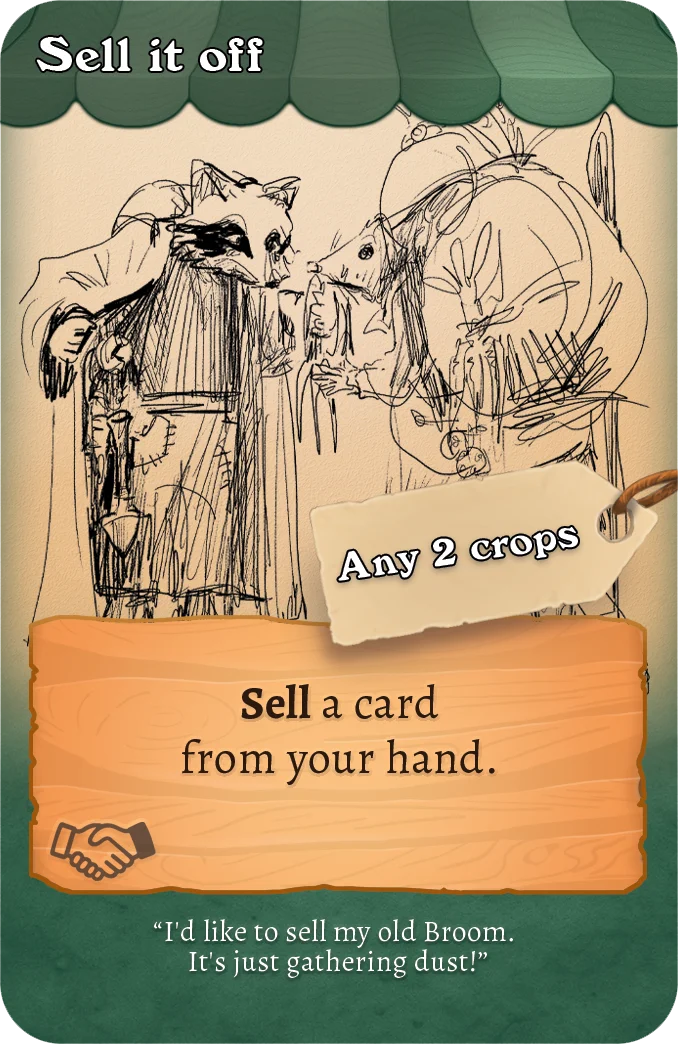
Example of a Sell effect.
Trash
Remove the card from your deck entirely, with no payout: place it in the Farm discard pile in the Market.
- If the card has a effect, it triggers after the card is removed.
- Then any "After you Trash..." effects trigger.
Gift
Remove the card from your deck and place it in a Rival's Discard pile. It's the thought that counts.
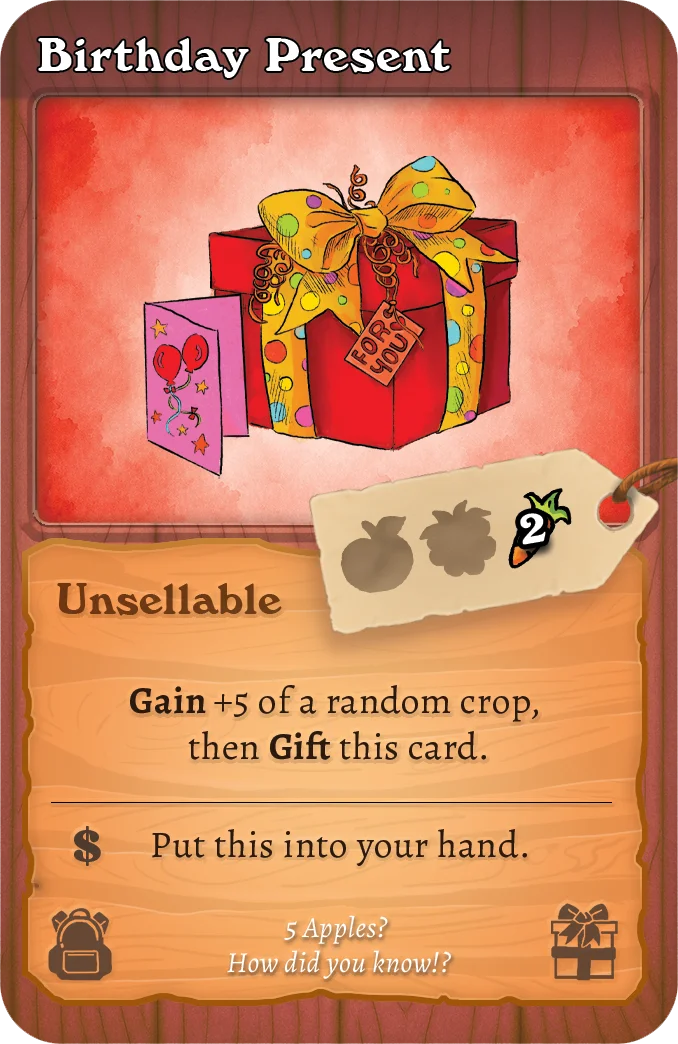
Example of a Gift card.
Discount
Roll the Yellow Die, then place a crop counter matching the rolled crop onto every Farm card in the Market.
Each counter on a Market card reduces its price by 1 of that crop. A card can never be discounted below a cost of 0 in any crop:
- Base cost 1 Apple, 2 Carrots, 0 Berries…
- …allows at most 1 Apple discount and 2 Carrot discounts, and never a Berry discount.
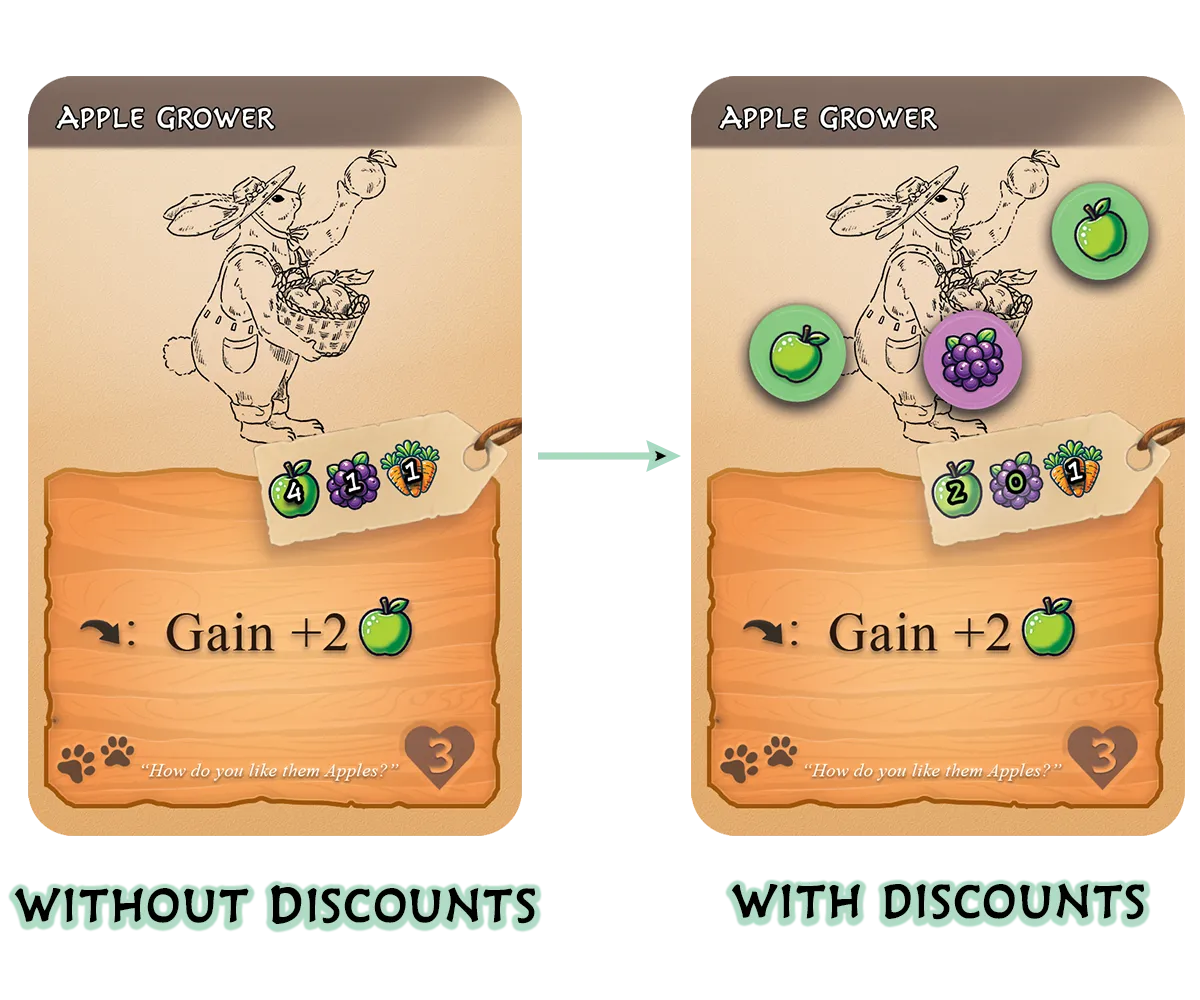
Discounts example.
Snatch (discounts)
Choose a Market card holding Discount crop counters. Take those counters into your Stash: the card's price returns to normal.
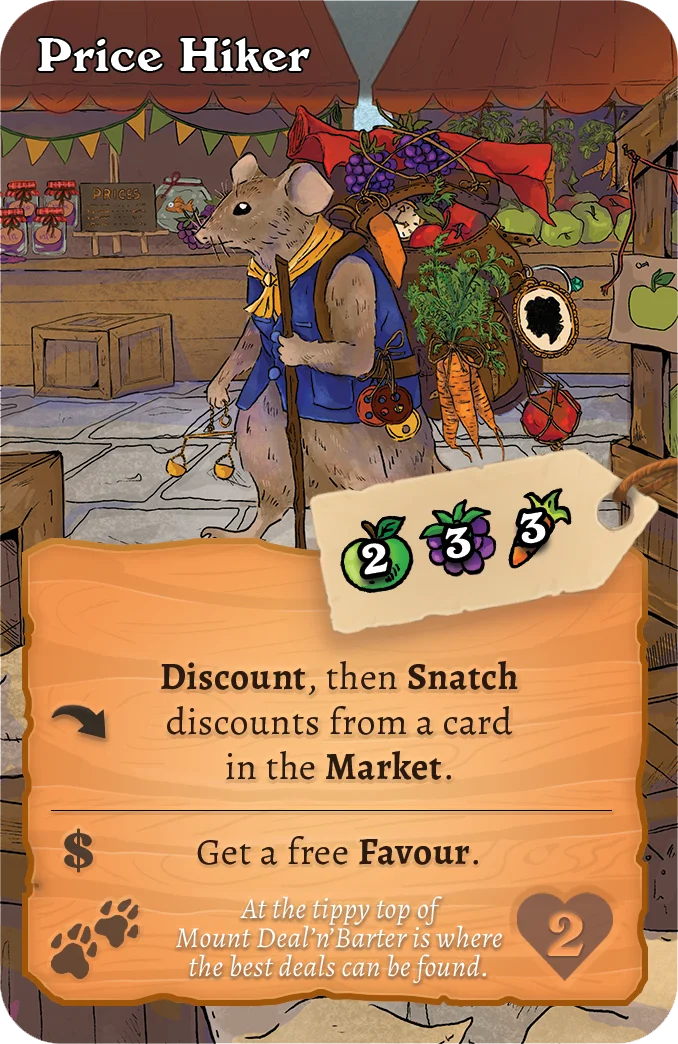
Example of a Snatch discounts effect.
Refresh
Choose a card in the Market to discard, and replace it from its row's deck.
- Refreshing several cards? Choose all of them before any are replaced.
- If an effect names a whole Market row, you refresh the entire row. No picking individual cards.
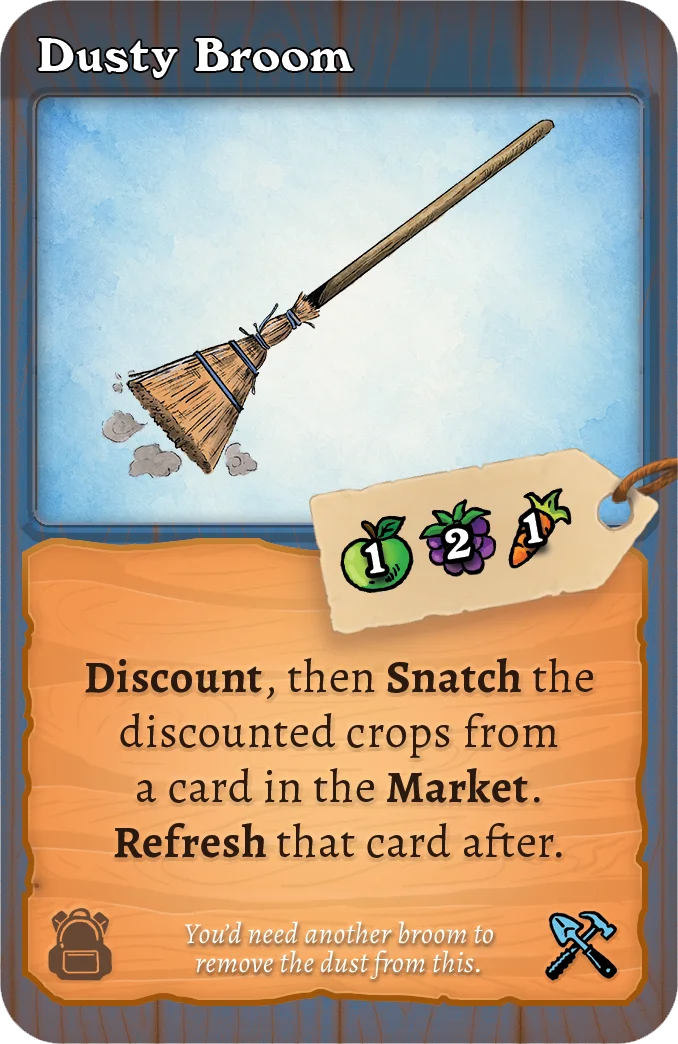
Example of a Refresh card.
Steal (crops)
Take the crops from a Rival's Stash and add them to yours.
- If no crop type is specified, you choose what to take.
- If a type is specified and the Rival has none of it, the Steal fizzles.
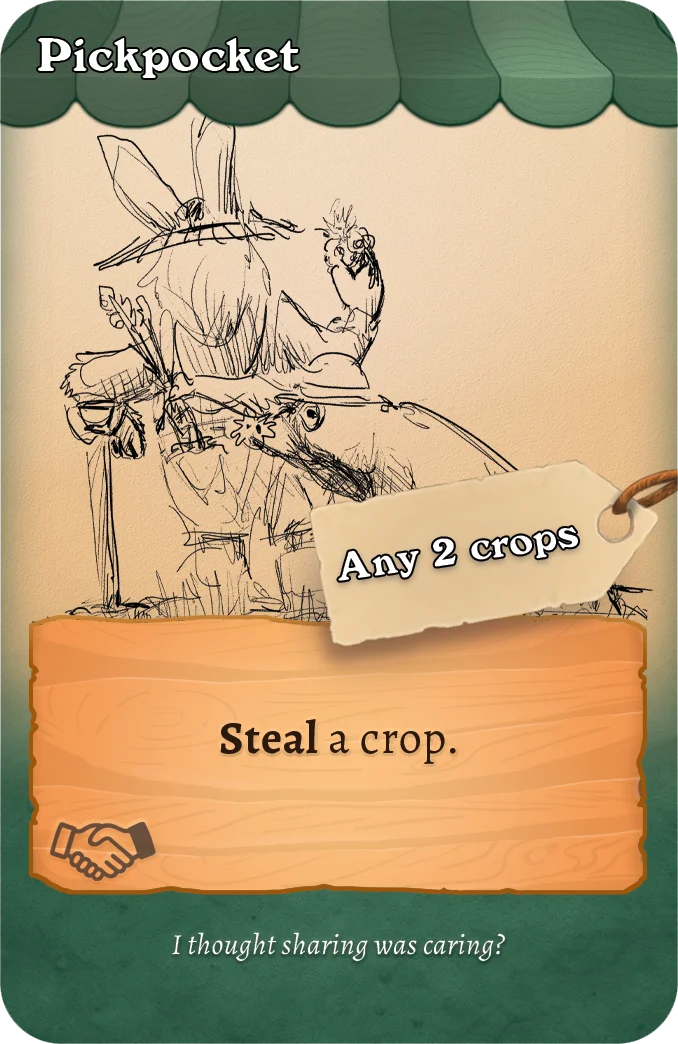
Example of a crop Steal card.
Discard
Put a card from your hand into your Discard pile. You can no longer play it this cycle.
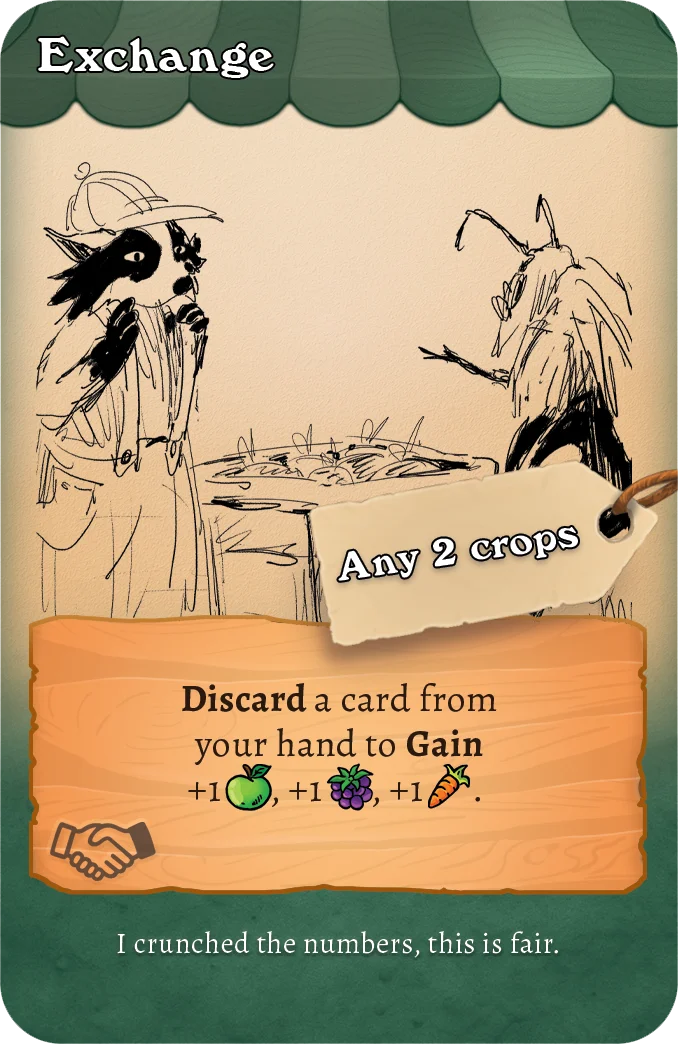
Example of a discard effect
Replant
Take a from your Discard pile and put it into play. It's now Planted, exactly as if played from your hand.
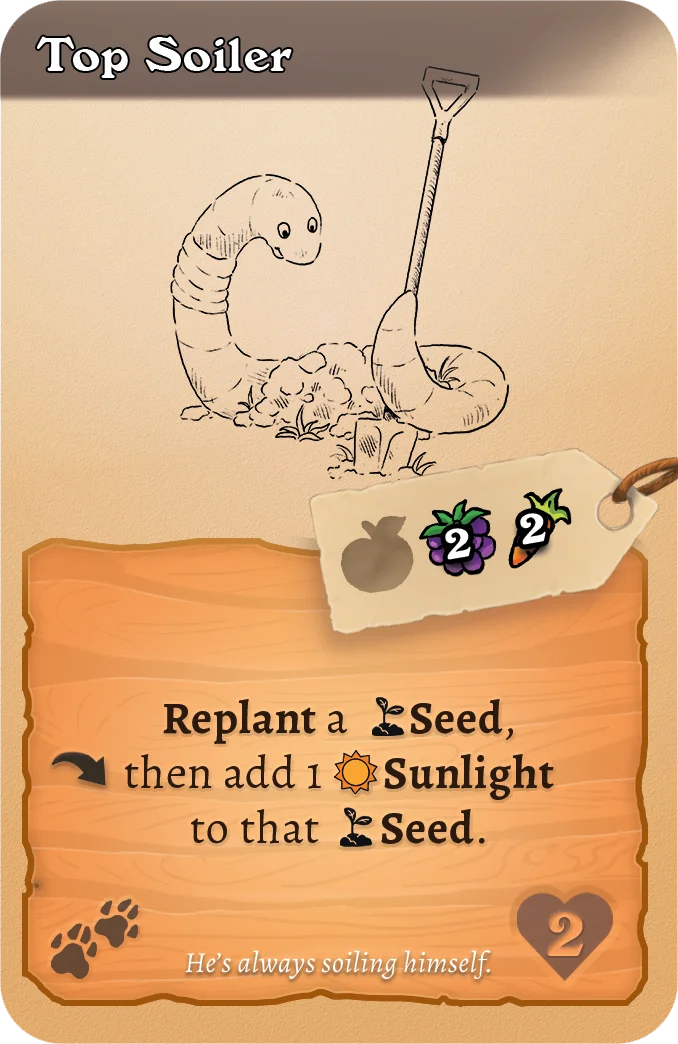
Example of a Seed Plant effect
Reset (deck)
Shuffle your Discard pile face-down into a new Draw pile. This happens automatically whenever you must draw from an empty pile, and some effects instruct it directly.
Some effects trigger whenever your deck is Reset.
Unsellable
UNSELLABLE cards can never be , by any means. They can still be or .
Example of an Unsellable effect.
Holdable
HOLDABLE cards may be kept in hand at the end of your turn instead of being discarded. Reveal the card to every other player, then keep it.
Example of a Holdable effect.
Refundable
REFUNDABLE cards can be directly from your hand instead of being played.
Example of a Refundable effect.
Icons
Exchange
A card section marked with a $ icon is its effect. It triggers when the card is Bought or :
- On Buy: the effect resolves before the card reaches your discard pile.
- On Sell: the effect resolves before the card leaves your deck.
Recycle
A card section marked with a recycle icon is its effect. It triggers when the card is during your turn, or :
- On Discard: the effect resolves before the card reaches your discard pile.
- On Trash: the effect resolves before the card leaves your deck.
Tips for beginners
Rules digested and still losing to your little sibling? A few habits that win games:
Production first
The most common beginner mistake is buying too early. Spend your first turns buying Farm cards that grow crops. A farm that produces 6 crops a turn completes orders twice as fast as one producing 3. Start packing once your engine hums.
Keep your deck lean
Every card you add dilutes every card you already have. or your cards as better ones arrive. A small deck of strong cards loops faster and draws its best cards more often.
Watch the Market, and your Rivals
The Market is shared. If a card is perfect for a Rival's strategy, buying it first, or it away, can hurt them more than it helps you. And keep an eye on Rival counts: at 4, every unfinished of yours is on the clock.
It's a marathon, not a sprint
Five takes a while. that need three turns to grow, that a big next turn, bonuses that compound. The patient plays usually beat the flashy ones. Plan a turn ahead, and spend your crops like a farmer, not a gambler.